
.gif)
If you manage a People Systems team, your primary constraint isn't your budget or your talent pipeline: it's your bandwidth. On any given Tuesday, your team is likely split between managing critical system updates, unsticking a transaction in a messy business process, and losing hours inside Workday Community trying to find the exact configuration syntax for an integration that worked perfectly three releases ago. Workday’s Deployment Agent promises to solve this exact productivity bottleneck.
Built as a specialized chat experience, it crawls a massive repository of information, including Community forums, implementer-only documentation, and curated reference sources, to deliver immediate, synthesized answers. It is an engine designed for sheer administrative speed.
But as any seasoned HRIS lead knows, there is a massive difference between speed (moving fast) and velocity (moving fast in the right direction). If your team uses the agent to blindly deploy quick fixes without understanding your tenant's downstream architecture, you aren’t actually being productive; you are just automating the creation of technical debt at lightning speed. To turn this tool into a genuine competitive advantage, you have to understand exactly where the agent accelerates your workflows, where it hits a structural wall, and how to combine its speed with human architectural oversight.
Where the Deployment Agent Excels
The Deployment Agent is exceptionally good at execution mechanics, syntax generation, and documentation retrieval. Historically, when an analyst needed to configure a new feature or troubleshoot a calculated field error, they had to dive into the forum rabbit hole, filter through conflicting threads from four years ago, and trial-and-error the build in a Sandbox. The agent compresses that multi-hour research loop into an instant, actionable blueprint. The agent is very good with:
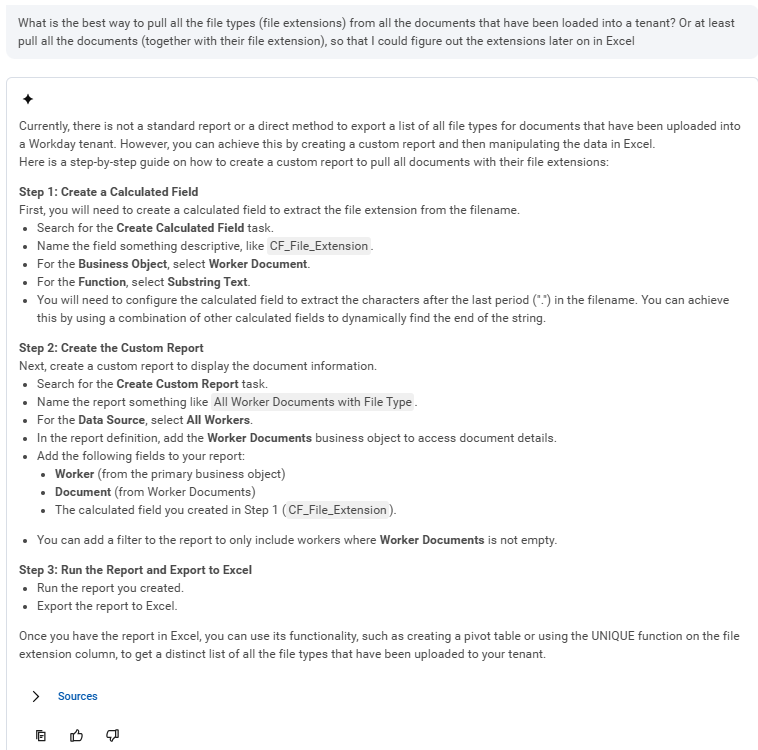
- Accelerating Configuration: It eliminates the guesswork when drafting calculated fields or mapping out structural alignments, such as linking Compensation Grades directly to your Job Requisitions. For example, it can provide a quick starting point for building something that pulls worker documents out of a tenant.
- Streamlining Troubleshooting: It excels at diagnosing cryptic web service errors, identifying why a specific validation rule isn't firing, or pinpointing the exact culprit when a business process isn't routing correctly.
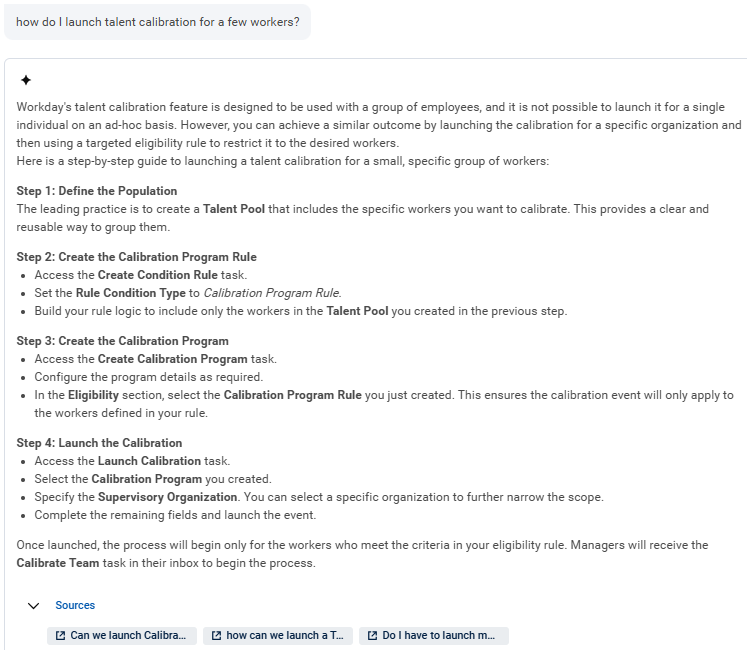
- Leveling Up System Fluency: If an analyst hasn't touched a specific module in a couple of release cycles, the agent provides a judgment-free environment to get a high-level refresher on complex module architecture (like the key functional components of Time Tracking or the reporting impacts of Supervisory vs. Custom Organizations). It allows your team to have confident conversations with internal stakeholders ten times faster than traditional manual research. For instance, it can retrieve the exact steps to launch Talent Calibration for a select group of workers in just two minutes.
From drafting end-user training guides for mobile expense submissions to defining the reporting boundaries between Advanced and Matrix reports, the agent clears out the cognitive drag of basic system administration, but it does have its downsides as well.
The Structural Wall: Where AI Sometimes Falls Short
True productivity drops to zero the moment a "quick fix" causes a downstream breakdown. The core limitation of the Deployment Agent is that it operates in a silo. It evaluates data and answers questions based on a generic, factory-default configuration model, meaning it has no visibility into your specific, custom tenant setup or legacy technical debt.
For example, if you ask the agent how to fix a "Required Field Missing" error on a Put Hire Employee EIB spreadsheet, it will accurately identify the mandatory data elements for that specific interface. It will not, however, stop to analyze your data model and tell you that the spreadsheet is throwing errors because your underlying Job Profile hierarchy is broken or your custom data conversion rules are out of alignment.
Similarly, if an analyst asks the agent how to build a complex Composite Report to compare expense actuals against a General Ledger budget, the agent will write the step-by-step guidance flawlessly. But it won't warn you that building that specific report layout is a band-aid over a flawed Spend Category mapping structure. Workday is a unified ecosystem where an edit in one module triggers a ripple effect across multiple downstream systems. The Deployment Agent currently lacks the cross-module critical thinking to look for these dependencies.
Consider data migrations and connectivity. If your team is using Object Transporter (OX) to move complex condition rules between tenants, the agent can provide best practices for resolving migration failures. What it cannot evaluate is the security or downstream integration impact of those rules. If you ask the agent how to enable public web services for an Integration System User (ISU) or configure an X.509 certificate for digital signatures, it will output the correct technical steps. It will not cross-examine your security design to ensure you aren't exposing sensitive PII or payroll results to unauthorized endpoints.
If an analyst asks how to bypass an approval step in a staffing process, the agent won't check whether your external payroll processing relies on a standard EIB or a Payroll Effective Change Interface (PECI) that pulls data directly from that exact step. An hour saved on configuration research is a massive net loss if it triggers a 40-hour emergency project to reconstruct corrupted payroll data or audit a compliance breach.
Shifting from Builders to Editors
To maximize your team's velocity, you must change how your analysts interact with the agent. If your admins are still building every calculated field or integration mapping from scratch, you're missing the point. The high-performing People Systems teams use the agent to handle the raw drafting, while the human analysts step in to edit, audit, and contextualize the architecture.
Instead of spending an hour looking up reference IDs or verifying which fields are strictly required for an Enterprise Interface Builder (EIB) upload, let the agent pull the exact criteria. Your analyst’s job is no longer to sweat the syntax ; their job is to stress-test that logic against your global security groups, your localized compliance rules, and your downstream interfaces.
|
When to Leverage the Deployment Agent (Speed) |
When to Rely on a Human Architect (Velocity) |
|
Verifying calculated field syntax and logic paths. |
Designing your global security inheritance and unconstrained roles. |
|
Troubleshooting EIB validation and missing field errors. |
Redesigning Core HCM data structures and Job Profile hierarchies. |
|
Retrieving step-by-step feature activation checklists. |
Evaluating cross-module touchpoints and downstream integration logic. |
|
Identifying Reference IDs and class indexes for data loads. |
Navigating international compliance handoffs (like EMEA Works Councils). |
The Deployment Agent is the most effective tool we have seen for eliminating the administrative research drag of system maintenance. If you treat it as an exceptionally fast assistant to clear out the tactical noise and handle basic troubleshooting, your team’s productivity will skyrocket. Just don't hand over the steering wheel. Let the AI generate the building blocks, but let your human architects build the house. That is how you run a lean, high-velocity People Systems team that scales cleanly with the business.
Key Takeaways
Need help navigating your Workday Deployment Agent? Our team is ready to provide expert support and strategic advising.


Leverage AI for Tactical Speed
Leverage AI for Tactical Speed
Leverage AI for Tactical Speed
Utilize the Deployment Agent as a high-speed assistant for compressed documentation research, immediate syntax generation, and tactical troubleshooting of standard system errors.
Leverage AI for Tactical Speed
Utilize the Deployment Agent as a high-speed assistant for compressed documentation research, immediate syntax generation, and tactical troubleshooting of standard system errors.

Understand Contextual Limitations
Understand Contextual Limitations
Understand Contextual Limitations
Recognize the structural wall; the agent operates in a silo and cannot account for your specific technical debt, custom security inheritance, or complex cross-module dependencies.
Understand Contextual Limitations
Recognize the structural wall; the agent operates in a silo and cannot account for your specific technical debt, custom security inheritance, or complex cross-module dependencies.

Shift from Builders to Editors
Shift from Builders to Editors
Shift from Builders to Editors
Transition your team from manual builders to strategic editors by letting AI handle administrative drafting while human architects audit logic and stress-test downstream impacts.
Shift from Builders to Editors
Transition your team from manual builders to strategic editors by letting AI handle administrative drafting while human architects audit logic and stress-test downstream impacts.


